Apple unveiled iPhone Duo on September 9 and opened real developer resources for it the same week, ahead of an October 23 release. That’s a short runway. Whether you own the app or the SDK other apps embed, the question isn’t “should we support it,” it’s “what breaks first, and in how many places at once.” This is that audit, built against Apple’s actual documentation rather than a guess at what it might say.
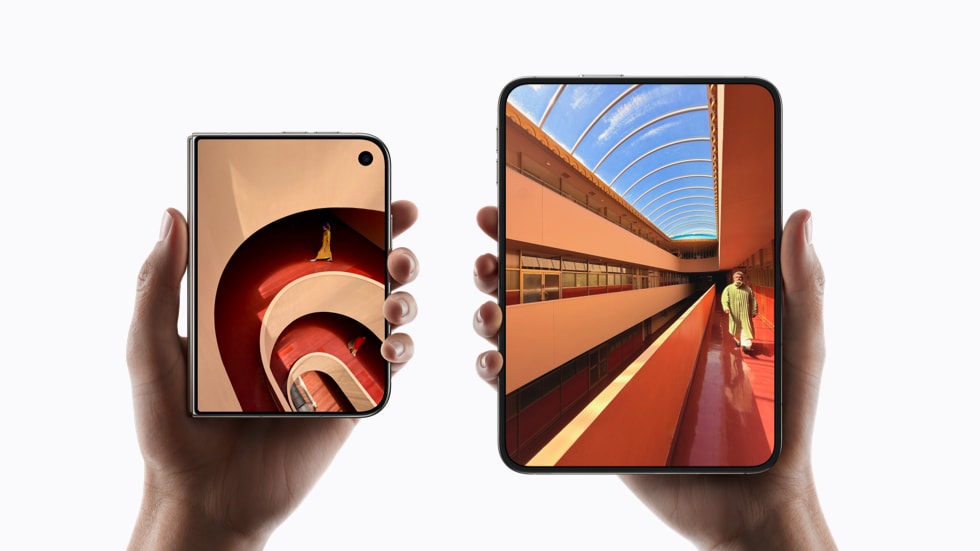 iPhone Duo’s outer and inner displays. Source: Apple Newsroom.
The hardware, briefly
A 5.4” outer display and a 7.6” inner display, both Super Retina XDR with ProMotion, on an A20 Pro chip with a dual-battery architecture. Closed, it behaves like a normal phone. Opened, the inner display is closer to an iPad mini in usable area. All specs from Apple’s own announcement. The engineering question isn’t the hardware, it’s what an app now has to survive: a display change mid-session, not just a device it happened to launch on.
What Apple’s documentation actually says to do
Apple’s guidance lives in three places: the iPhone Duo developer hub, the Human Interface Guidelines, and a set of WWDC-style sessions and Group Labs running through late September. Building against an existing app, six things stood out as the real work, not the hardware-specific trivia.
Size classes, not idiom or screen checks. Apple’s own phrasing is direct: use size
classes and local view or scene geometry, and avoid layout branches based on device idiom.
The outer display reports regular-vertical, compact-horizontal, same as a normal iPhone in
portrait. The inner display reports regular in both dimensions, which is what unlocks sidebar
layouts. Any code checking UIScreen.main, a device model string, or interface orientation
for a layout decision is checking the wrong thing, and Apple’s guidance says so explicitly:
the inner display doesn’t respect an app’s declared supported orientations once it’s
resizable. (No code sample here — I don’t have an official one from Apple to quote yet;
once the “Preparing your app for iPhone Duo” technical documentation is published, this is
the section to update with their actual example.)
NavigationSplitView and UISplitViewController already adapt. If an app’s navigation
is already built on these, Apple’s guidance is that they adapt to fold state automatically.
The real requirement is preserving the same app hierarchy across poses, not gating any
feature behind having the device open.
Safe areas are asymmetric — handle each edge independently. This is stated plainly in
Apple’s guidance: safe areas on iPhone Duo are often not equal on both sides. The fix is
reading each side of the safe area insets independently instead of assuming a fixed or
mirrored inset, and letting background content go full-bleed while keeping controls inside
the safe area. Reserved regions, queried with reservedRegions(kind:), are a separate API for
the hinge and the cameras.
Toolbars need to be system-managed, not custom UIKit bar instances. Apple’s guidance is
specific here: standalone bar instances don’t participate in the vertical layout iPhone Duo
needs. Toolbar items built with ToolbarItem inside a navigation or tab container do, and a
new ToolbarOverflowMenu consolidates overflow into one system menu rather than the app
inventing its own.
Two-pane layout has a real API now, not a pattern you build yourself. SwiftUI’s
ArrangementView (and UIKit’s UIArrangementViewController) is the documented way to lay
out two views across the fold, split when both need to stay visible, overlay when one is
foreground and one is background. Apple’s guidance explicitly warns against nesting
navigation containers or scroll views inside an arrangement.
The hinge itself is an API, and it can be absent. onHingeChange in SwiftUI and
UIHingeInteraction in UIKit expose both discrete fold states and the continuous angle.
Every app checking hinge state needs a path for devices that don’t have one, which by
definition is every device except this one.
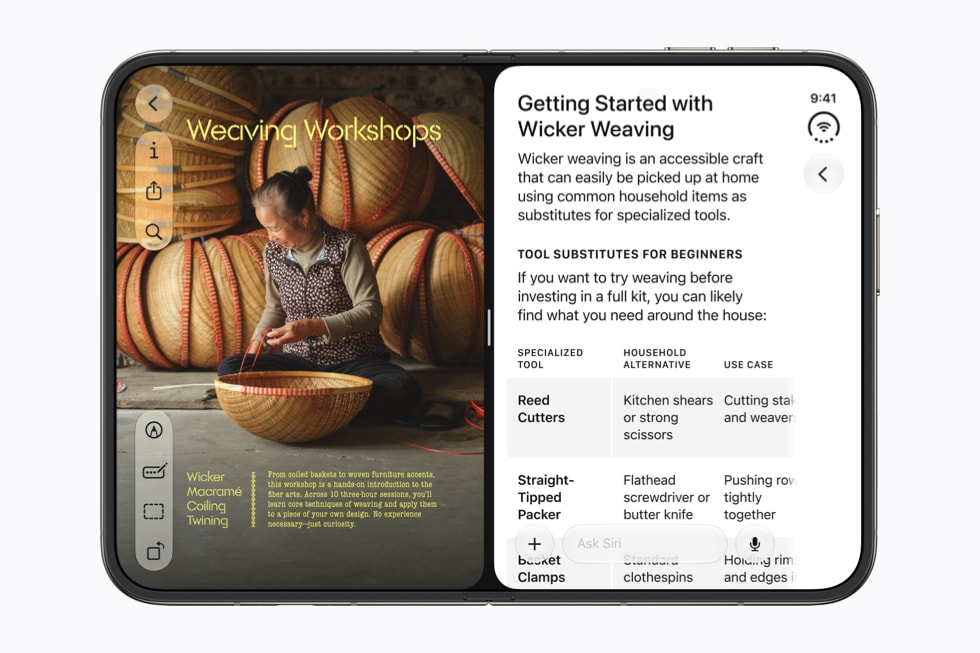 A split-view layout across the fold. Source: Apple Newsroom.
The audit, as a table
This is the actual checklist I’m running against each of the 50+ apps on the platform, grounded in the guidance above rather than a general “foldables are hard” list.
| Area | What to check | Apple’s guidance |
|---|---|---|
| Layout | Size-class-driven, or width/idiom-based? | Use size classes and local geometry; avoid idiom-based branches |
| Navigation | NavigationSplitView / UISplitViewController, or a custom stack? |
These adapt to fold state automatically when already in use |
| Safe area | Read per-edge at runtime, or a single fixed inset? | Insets are often asymmetric; read each side independently, and use reservedRegions(kind:) for hinge and camera regions |
| Toolbars | System-managed (ToolbarItem), or standalone bar instances? |
Standalone bars don’t participate in vertical layout |
| Two-pane content | Hand-rolled split view, or ArrangementView/UIArrangementViewController? |
This is now a real API, with split vs. overlay as documented modes |
| Hinge state | Checked with a fallback for no hinge, or assumed present? | onHingeChange / UIHingeInteraction; every non-Duo device has none |
| Camera UI | Assumes one continuous viewport? | AVCaptureDevice.RotationCoordinator and direction APIs exist for this; flagged for hands-on device testing |
Simulator support isn’t here yet
There’s no way to run any of this in Simulator today. Apple’s developer
hub lists the SDKs, build, and run/test support for
iPhone Duo as landing in Xcode 27.1 beta, “coming later this month” — so until that beta
drops, the audit above is a documentation-and-code review, not a simulated one. Once 27.1 beta
is out, its Device Hub is where I’m starting: open, closed, rotated, and partially folded
states in simulation. Camera behavior, Touch ID in the side button (Duo doesn’t use Face ID),
and anything involving the accessory/teleprompter display via CameraCaptureAccessory will
still need a real unit before I’d call them verified, simulator or not.
Where Xcode Intelligence fits into this
Two things from the same announcement are worth calling out since they land in the same
Xcode 27 release as Duo support: Foundation
Models
going generally available, and Xcode Intelligence shipping on-device code completion. I’m
using Xcode Intelligence directly on the size-class rewrite in the checklist below. It
doesn’t know anything about ArrangementView that I don’t, but it’s meaningfully faster at
the mechanical part: finding every UIScreen.main reference and drafting the size-class
replacement, which is most of what step 1 actually is.
What I’d do this week, in order
- Grep the codebase for
UIScreen.main.bounds, device idiom checks, and interface orientation used for layout decisions. Every hit maps to the size-class rewrite above. - Check whether navigation is already on
NavigationSplitView/UISplitViewController. If not, that’s the higher-leverage fix, independent of Duo. - Audit for fixed safe-area insets instead of reading each edge independently.
- Check for standalone UIKit bar instances outside a system-managed container.
- Once Xcode 27.1 beta ships, run the app through the Device Hub’s fold-state changes mid-session, not just at launch, watching for state that doesn’t survive the transition.
- Book a slot in Apple’s iPhone Duo Group Labs if anything above turns up a real question — that’s what they’re there for.
None of steps 1 through 4 are Duo-specific work in the sense of new code written for a new
device. NavigationSplitView, proper size-class handling, and safe-area discipline have been
the right answer since the iPad got multitasking. Duo just moved the deadline up, and gave
the size-class-driven apps on the platform a noticeably shorter list than the ones that
weren’t.
References
- Apple Newsroom: Apple unveils iPhone Duo — device announcement, specs, release date
- Apple Newsroom: Apple introduces Siri AI, a profoundly more capable and personal assistant — onscreen awareness, personal-context search
- Apple Newsroom: Apple Intelligence brings powerful AI capabilities into everyday experiences — Foundation Models, on-device and Private Cloud Compute
- Apple Developer: iPhone Duo developer hub — Xcode 27.1, sessions, labs, workshops
- Apple Developer: Designing for iPhone Duo — Human Interface Guidelines
- 9to5Mac: Apple launches iPhone Duo developer resources ahead of October release — rollout timeline and lab schedule