Apple shipped a new framework for on-device models at WWDC26 and called it Core AI. The name invites a simple reading: Core ML is the old thing, Core AI is the new thing, start migrating. Some coverage has said exactly that. Apple has not. Its Core AI developer page does not mention Core ML at all, and I found no deprecation notice or date anywhere.
The most detailed public migration I have seen points the other way. Ultralytics added Core AI to its YOLO iOS SDK in September, benchmarked every task on an iPhone 17 Pro, and shipped it as an opt-in. Core ML stayed the default. The GitHub issue that opened as “Migrate default YOLO26 iOS runtime to Apple Core AI” was retitled two days later to “opt-in now, criteria for making it the default.”
I think that is the right call for most teams in October 2026. The reasons are architectural as much as they are about speed, which is why they are worth spelling out.
What this is based on. I have not migrated a production app to Core AI. The numbers below are Ultralytics’ published measurements, the API details come from Apple’s and Ultralytics’ documentation, and the code is quoted from the Ultralytics SDK source. What I add is how I would structure it, from having owned an SDK that ran on-device inference inside 50+ customer apps.
A new deployment path, not a renamed Core ML
The first thing to know is that you cannot convert in place. A .mlpackage cannot be renamed
to .aimodel. In the words of the Ultralytics docs, “they contain different model
representations and are loaded by different frameworks.” You re-export from the source
PyTorch model with Apple’s coreai-torch. The same docs put it plainly: “Core AI is a new
deployment path rather than a new name for Core ML,” and “Apple continues to support Core ML.”
What Apple does promise for Core AI is real: a memory-safe Swift API, automatic specialization
for the device’s hardware, ahead-of-time compilation, control over inference memory,
zero-copy data paths and stateful execution. There is also a new toolchain around it:
coreai-optimization for quantization and palettization, coreai-models for export recipes
and Swift runtime helpers, a Core AI Debugger app for macOS, and Xcode and Instruments support.
| Core AI | Core ML | |
|---|---|---|
| Model format | .aimodel |
.mlpackage, .mlmodel |
| Conversion | coreai-torch, from PyTorch |
coremltools |
| Minimum OS | iOS 27, macOS 27, built with Xcode 27 | The OS versions your app already supports |
| iOS Simulator | Not available, the Simulator SDK has no Core AI | Available |
| Vision integration | None. The app letterboxes the image and builds NDArray tensors itself |
Direct. Vision handles preprocessing |
| Input shape | Fixed. The graph is traced at one input size | Flexible shapes supported |
| NMS inside the model | Not supported, coreai-torch has no NMS lowering, so NMS runs in Swift |
Can be packaged into the model |
| Load cost | One-time specialization, then tens of milliseconds | In the Ultralytics SDK, about 1 to 2 s to compile a bundled .mlpackage on every launch |
| Precision in the Ultralytics export today | FP16 only | INT8 shipped |
| Non-neural models (trees, tabular) | Not the target | Apple still points these at Core ML |
Three rows decide most of this: the minimum OS, the Simulator, and Vision. Together they mean adopting Core AI is not a swap. It is a second backend that only runs on part of your user base, can’t run in the environment most CI uses, and needs preprocessing code that Core ML users never had to write.
What the iPhone 17 Pro numbers say
The headline people repeat is that Core AI runs models about twice as fast. For model time alone, that holds. For the whole pipeline, it mostly does not.
Ultralytics measured YOLO26n on an iPhone 17 Pro running iOS 27.0, with hardware acceleration on, in a release build. Each number is the median of three interleaved rounds of 15 runs after three warmups, averaged over two cooled launches. Totals include preprocessing, inference and postprocessing, in milliseconds.
| Task | Core AI FP16 | Core ML FP16 | Core ML INT8 (shipped) | Their verdict |
|---|---|---|---|---|
| Detect | 3.73 | 4.05 | 4.59 | Core AI ahead |
| Segment | 5.33 | 5.24 | 5.79 | Tie |
| Pose | 4.02 | 4.06 | 4.09 | Tie |
| OBB | 3.65 | 3.99 | 3.79 | Tie, Core AI slightly ahead |
| Classify | 1.19 | 2.34 | 1.98 | Core AI ahead |
| Semantic | 8.55 | 4.86 | 4.95 | Core AI behind |
| Depth | 7.87 | 6.62 | 6.42 | Core AI behind |
Source: Ultralytics, yolo-ios-app issue #320 and docs/performance.md. Median run-to-run spread
was 3%, worst 17%, so the pose and segment gaps are noise.
The raw model is genuinely faster. Detect inference takes 2.05 ms on Core AI against 3.58 to 4.58 ms on Core ML. Then Core AI pays about 1.2 ms of CPU preprocessing per frame, because there is no Vision doing it inside the request, plus NMS in Swift. That gives most of the gain back. Semantic segmentation is slower because the in-graph argmax was unreliable (more on that below), so it runs in Swift at about 3.8 ms per frame.
Three more results matter for a default:
- CPU-only is 1.5 to 2x slower on Core AI for every 640-pixel task. Only classify is faster. Any code path that falls back to the CPU gets worse, not better.
- Downloads are about twice the size. The Core AI assets are FP16 because the Ultralytics package cannot export INT8 Core AI yet. Apple’s optimization tools support quantization and palettization, but the export pipeline has not caught up. Ultralytics notes FP16 and INT8 Core ML are within noise of each other on this device, so INT8 only buys you download size.
- Load time is the clear win. After a one-time specialization (0.6 to 3 s for nano models, 2 to 7 s for the largest), a Core AI model loads in tens of milliseconds. Switching between models is visibly faster.
On that last point, read the baseline carefully. The comparison is against compiling a bundled
.mlpackage on every launch. An app that compiles once and keeps the compiled model pays that
cost less often, so measure your own baseline before treating load time as the deciding factor.
My read of the whole table: for vision pipelines on current hardware, Core AI is level end to end, ahead on load and model switching, and behind on semantic, depth, CPU-only and download size. Level is not a reason to make a beta runtime the default for everyone.
Running both: the dual-backend shape
If Core AI only runs on iOS 27 devices, you need Core ML for as long as you support anything older. So the question is not which framework to pick. It is where the choice lives, so it doesn’t leak into every feature.
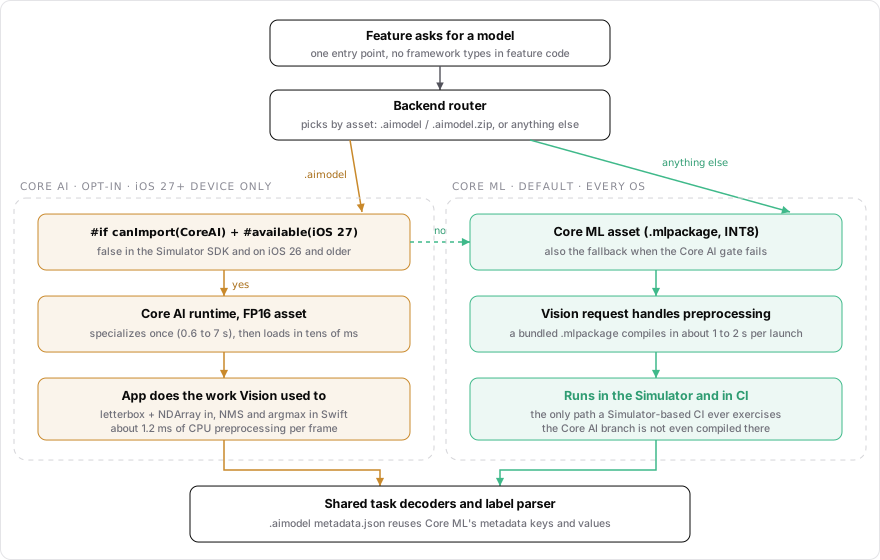
The asset decides the backend. Core ML is the default and the only path CI exercises. Core AI is opt-in, device-only and gated twice.
The Ultralytics SDK does four things I would copy.
The asset picks the backend. An .aimodel path or an .aimodel.zip URL goes to Core AI.
Anything else goes to Core ML. Feature code never asks which framework it is on.
let ext = unwrappedModelURL.pathExtension.lowercased()
if ext == "aimodel" {
  try predictor.loadCoreAIModel(at: unwrappedModelURL, useGpu: useGpu)
  predictor.isModelLoaded = true
  DispatchQueue.main.async { completion(.success(predictor)) }
  return
}
Source: Sources/UltralyticsYOLO/BasePredictor.swift, ultralytics/yolo-ios-app at commit
1f1ee5f (AGPL-3.0).
Capability is gated twice. #if canImport(CoreAI) handles builds where the framework does
not exist at all, like the Simulator SDK. #available(iOS 27.0, *) handles older OS versions on
a device. One property answers the question for the whole SDK.
public static var isCoreAIAvailable: Bool {
  #if canImport(CoreAI)
    if #available(iOS 27.0, *) { return true }
  #endif
  return false
}
Source: Sources/UltralyticsYOLO/CoreAIRequest.swift, same commit.
It is off by default. The demo app has a Settings toggle, “Core AI Models (iOS 27+)”, and only lists Core AI models when it is on.
Everything after the tensor is shared. The .aimodel export writes its metadata with the
same keys and values as the Core ML export, so the label parser is reused. The Core AI output
tensors go into the same task decoders the Core ML path uses. The SDK even wraps Core AI in a
VNRequest-shaped carrier so every predictor drives both backends through one interface.
For an SDK that other apps embed, I would add four things on top.
- Make the default remotely switchable. A Settings toggle is fine for a demo app. In production, the default backend should be a config value you can flip back without a release. I learned to value that lever on a server-driven SDK, where most changes did not need a client build.
- Don’t rely on try/catch alone for fallback. Some failures throw, and you can catch them. Others abort the process inside Apple’s runtime (see the next section). For those, persist a marker before loading a Core AI asset and clear it after. If the marker is still there on the next launch, use the Core ML asset for that model.
- Compile the Core AI branch in CI, even if you cannot run it there. A Simulator build has
no CoreAI module, so the
#if canImport(CoreAI)branch is never compiled. Ultralytics notes its CI only exercises the Core ML path. Add a device-SDK build step so that branch at least compiles on every change, and plan real device runs for behaviour. - Download the asset the device can use. Bundling both formats ships two copies of every
model. The Ultralytics app picks
.aimodelor.mlpackageper device for remote models. That keeps the size cost of FP16 limited to devices that run it.
The beta pitfalls, and what each one costs
Core AI and parts of its toolchain are beta software, and the Ultralytics work hit most of the sharp edges a production team would. This is the list I would read before writing any code.
| Issue | What happens | Mitigation in the Ultralytics SDK |
|---|---|---|
| FP16 end-to-end pose head (apple/coreai-torch#115) | Returns wrong output under hardware acceleration with default specialization, with no error. 0 people detected on a test image where the raw head finds 4 | Ship the raw head. CPU-only, GPU-preferred and FP32 are correct |
| In-graph argmax (apple/coreai-torch#116) | Wrong class map under hardware acceleration. A float16-output variant aborts the process | Run argmax in Swift, at about 3.8 ms per frame |
| Stale specialization cache | After an asset is replaced under the same path, or the app is reinstalled, the load fails with _GenericObjCError.nilError instead of rebuilding |
Evict the cache entry and retry once |
| Output allocation limit (apple/coreai-torch#75) | Reported hard crash after 2^14 output NDArray allocations, on all compute units |
Not reproduced in their 22,000-inference soak on device. Still worth a soak test of your own |
| Some FP16 assets on load | MPSGraph raises a failed assertion and the process ends, with no fallback | Fall back to FP32. The same asset loads with a CPU-only specialization |
| Naive tensor construction | NDArray(scalars:) copied element by element, about 55 ms per 640 x 640 frame |
Allocate the input tensor once and fill it in bulk |
The stale-cache retry is short enough to quote in full:
do {
  return try await AIModel(contentsOf: url, options: options).loadFunction(named: "main")
} catch {
  // On iOS 27.0 a stale specialization cache entry (the asset was replaced under the same path, or the app was
  // reinstalled) fails the load with `nilError` instead of being rebuilt, so evict it and specialize again.
  try? AIModelCache.default.deleteEntries(for: url)
  return try await AIModel(contentsOf: url, options: options).loadFunction(named: "main")
}
Source: Sources/UltralyticsYOLO/CoreAIRequest.swift, same commit. Six of their seven official
nano assets hit this after two days of reinstalls, and all recovered with the retry.
Two rows in that table produce wrong answers without any error, and two end the process. Those are the ones that should shape your architecture. A wrong answer needs a correctness test, and a process abort needs a fallback that survives a crash. A slow load only needs a spinner.
A smaller trap: the iOS Simulator has no Core AI, and macOS 26 has no system Core AI framework. The pip runtime you can install on a macOS 26 Mac is a CPU reference build, so it cannot tell you anything about device latency. Every Core AI number you care about comes from a real device on iOS 27.
Where AI fits
Apple pitches Core AI for everything “from compact vision models to large-scale generative AI.” The public migration evidence I found is all vision. Stateful execution and fine-grained memory control are the features that matter most for generative models, and I have not seen comparable public numbers for a language model on Core AI against Core ML. So treat the conclusion of this post as being about vision models. For a generative feature the trade could come out differently, and for plain text generation many apps will reach for Foundation Models first anyway.
For developers building with AI, the bigger lesson is about evaluation. The pose bug in #115 returned a fast, confident, wrong answer. A latency benchmark would have scored it as a win. Only a correctness check caught it. If you run two backends, the eval suite has to run per backend, on a device, with golden outputs for each model you ship. That is the same discipline as gating an LLM feature on evals rather than on demos, applied one layer down.
Apple’s coreai-models repository also ships skills for coding agents, installable as a plugin
for agent tools. That is useful for export recipes and API usage. But an agent working against
a Simulator build cannot run Core AI at all, so anything it writes for this path is unverified
until it runs on a device. Keep the device in the loop.
The real-world impact shows up in who gets which backend. An SDK embedded in other teams’ apps, like the one I worked on at about 2.2M monthly active users, inherits every host app’s deployment target. It can’t default to an iOS 27-only runtime until most of those users are on iOS 27, regardless of how good the runtime is.
When to flip the default
Ultralytics wrote down seven criteria for making Core AI the default. I think they work as a template for any team, with each one translated into something you can check in your own app.
| Their criterion | Where it stood in issue #320 | What I would check in my own app |
|---|---|---|
| CPU preprocessing (about 1.2 ms per frame) no longer costs the gain, and depth reaches parity | Tracked in yolo-ios-app #321 | Your own preprocessing cost per frame, on your slowest supported device |
| Semantic segmentation at parity end to end | Tracked in #322 and apple/coreai-torch#116 | Any postprocessing you had to move from the graph into Swift |
| The FP16 wrong-output bug is fixed, or shown irrelevant to every shipped graph | Avoided by shipping the raw head | A golden-output test per model per backend, on device |
| The stale specialization cache is fixed, or shown harmless across app updates | Worked around with evict and retry | An app update that replaces a model under the same name |
| INT8 or palettized Core AI export, so downloads match Core ML | Not yet, assets are FP16 | Your download-size budget per model |
| Every asset loads on device, re-benchmarked on the current iOS release | 17 of 35 verified when the criteria were written | Every asset you ship, on the current iOS point release |
| iOS 27 adoption high enough that the default helps most users | Open | Share of your own sessions on iOS 27 |
I would add two of my own before flipping it in anything other teams depend on: the crash-safe fallback has to be in place, and the default has to be reversible from config without a release. With both in place, flipping the default becomes a change you can undo the same day.
Until those boxes are checked, the useful work is the boundary, not the migration. Build the second backend behind one switch, keep Core ML as the default, and let the criteria decide when to flip it.